Opening balances
Starting part-way? Key what your old books showed on the day before you start in eaasycount.
On this page
Opening balances is for a business that starts keeping its books in eaasycount part-way, not on its first day. You choose the month you start, then key what your old books showed on the day before: what customers owe you, what you owe suppliers, your stock, the trial balance and the bank items not yet cleared.
Start date and trial balance
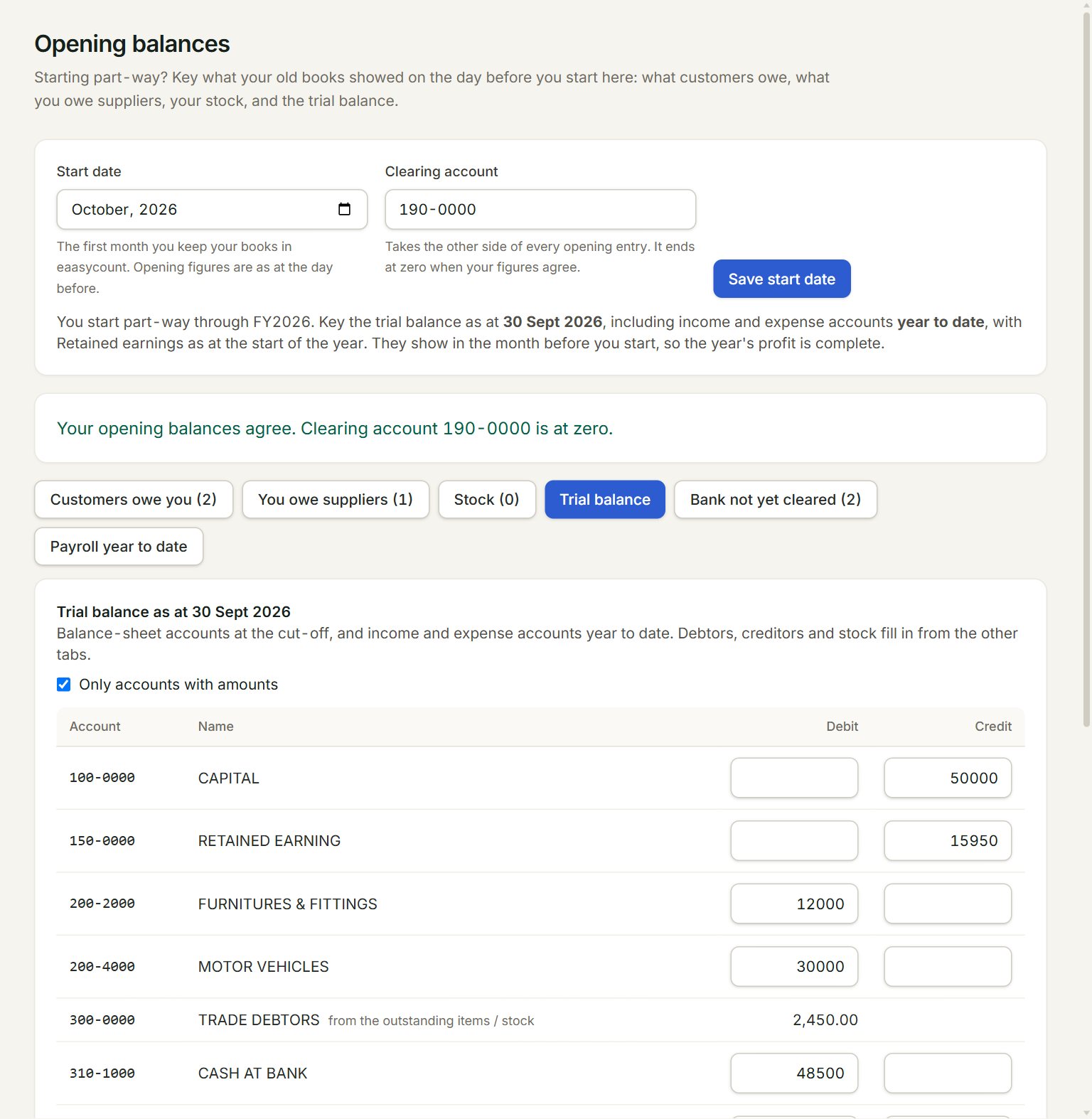
- Start date: the first month you keep your books in eaasycount. Everything is keyed as at the day before.
- Clearing account: takes the other side of every opening entry. eaasycount creates it for you.
- The check: Your opening balances agree when the clearing account is at zero. Otherwise it shows how much you are out by.
- The tabs, one for each part of your opening figures.
- A balance: key it under Debit or Credit, then click Save trial balance under the list. Debtors, creditors and stock fill in from the other tabs.
Key your opening balances
- In the menu, open Settings, then Opening balances. Choose the Start date and click Set start date.
- On Customers owe you, add one line per unpaid invoice, with its own number, date and amount owing. Click Save.
- On You owe suppliers, do the same for each unpaid bill.
- On Stock, key each item's quantity and unit cost, and click Save.
- On Trial balance, key every other account and click Save trial balance.
- Check that the note says Your opening balances agree.
Each invoice keeps its own number and date, so ageing, statements and receipts work as usual. A deposit or overpayment from a customer is a Credit. Paste a list from Excel saves typing: copy the cells from your old system's list and paste them in.
If you start in the middle of your financial year, key the income and expense accounts year to date as well, and retained earnings as at the start of the year. The screen tells you which. Only an admin can save opening balances.
Bank items not yet cleared
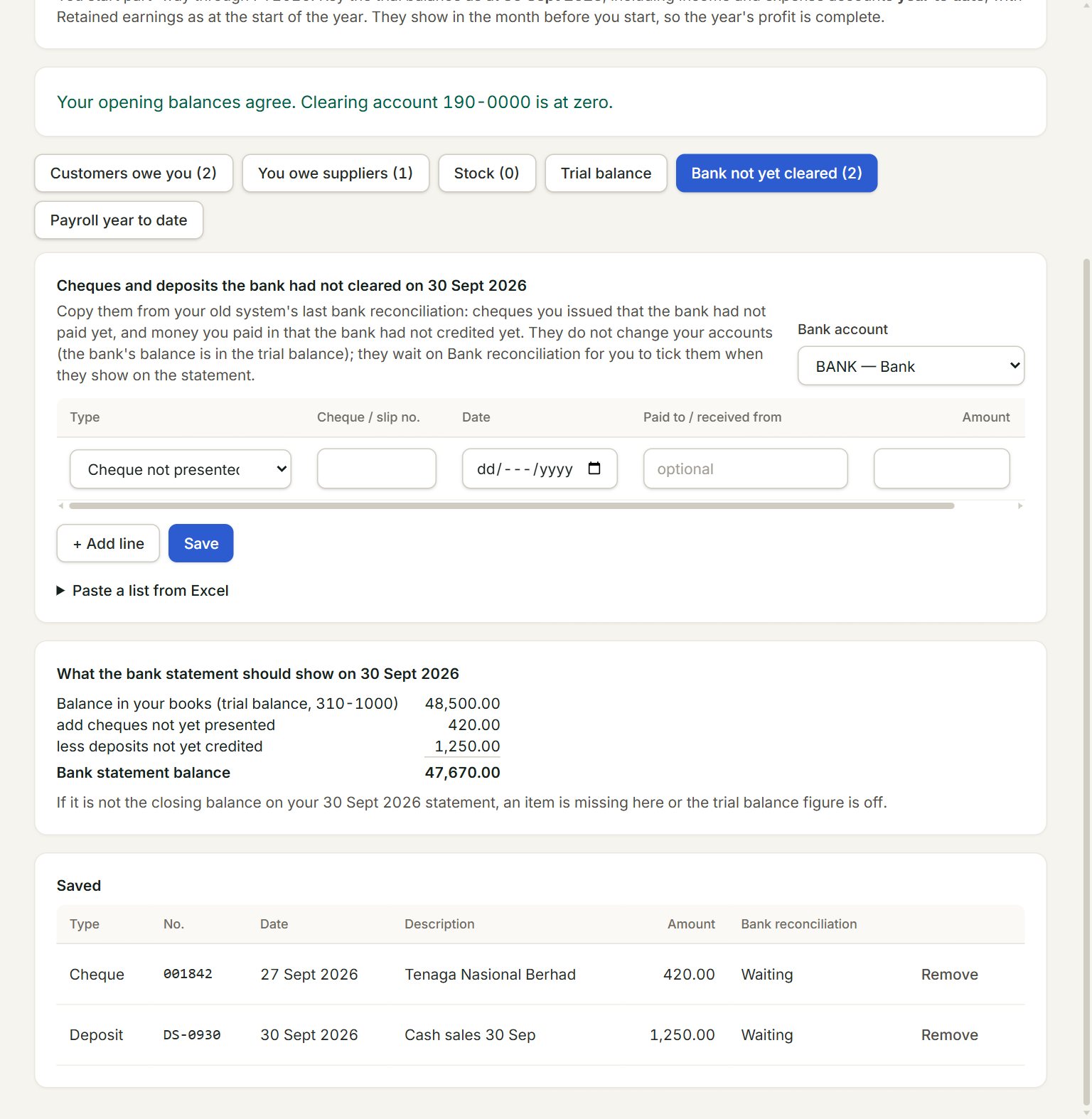
- Bank account: the bank these items belong to.
- Cheque not presented or Deposit not credited.
- + Add line: one line per cheque or deposit. Click Save when done.
- What your bank statement should have shown on the day before you started. It should match that statement.
- Waiting: not yet ticked in bank reconciliation.
Copy these from your old system's last bank reconciliation. They do not change your accounts. They wait in Bank reconciliation until you tick them.
Payroll year to date takes each employee's pay, EPF, SOCSO, EIS, PCB and zakat for the months paid before your first payroll here, so PCB and Form EA come out right.
If something goes wrong
- Not agreed yet: out by …: a figure is missing or wrong. Check the trial balance against the outstanding invoices, bills and stock.
- Remove is grey on an invoice: a receipt or payment is already knocked off against it. Edit that receipt or payment so it no longer pays this invoice first.
- No fiscal year covers …: add the year in Fiscal periods first.