Import from CSV
Bring in many customers or items at once from a spreadsheet, instead of keying them one by one.
On this page
Import from CSV adds many debtors (your customers) or items in one go, from a spreadsheet saved as a CSV file. Use it when you start, to bring in the lists from your old system or from Excel.
The screen
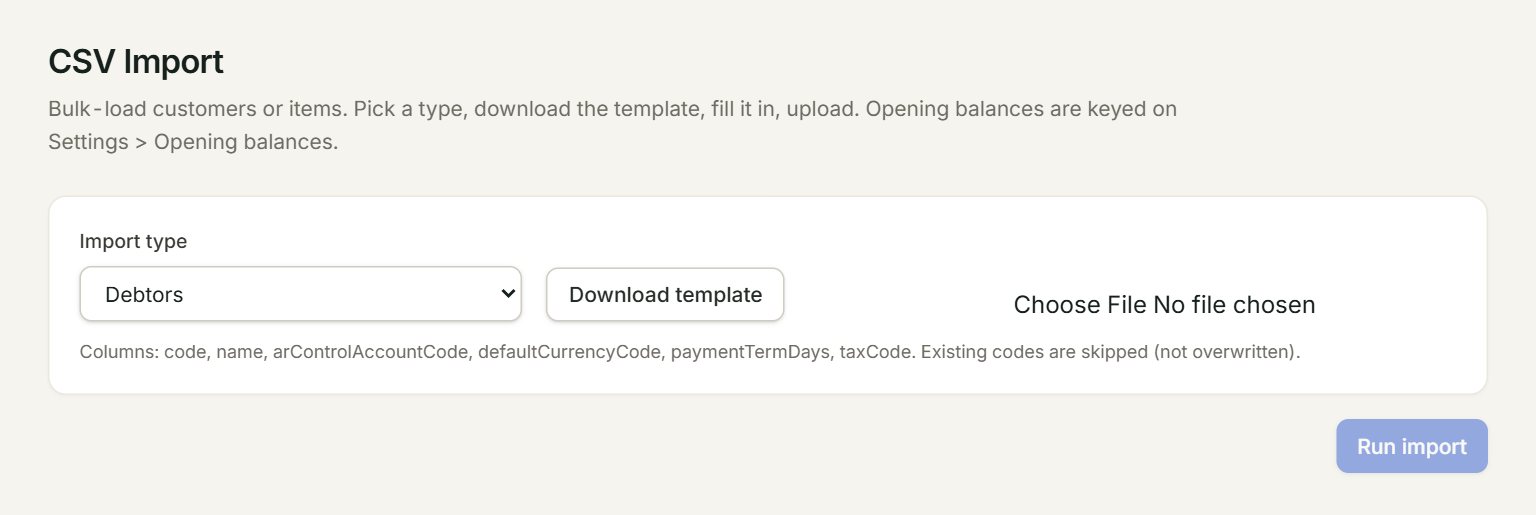
- Import type: Debtors or Items.
- Download template: a CSV file with the right headings and two example rows.
- Choose your filled-in file here. Its first rows show below, under Preview (first 5 rows).
- The columns this type needs.
- Run import: adds the rows.
Import your customers or items
- In the menu, open Settings, then Import from CSV.
- Choose the Import type and click Download template.
- Open the template in Excel. Keep the first row of headings and put your own rows under it, in place of the examples.
- Save it as CSV UTF-8.
- Choose your file on the screen and check the Preview.
- Click Run import. The green box says how many were inserted and skipped.
The columns
| Import type | Must be filled | May be left empty |
|---|---|---|
| Debtors | code, name, arControlAccountCode (your debtors account, for example 300-0000), defaultCurrencyCode (for example MYR) | paymentTermDays, taxCode |
| Items | code, description, uom, isStockItem (true or false) | defaultSalesAccountCode, defaultPurchaseAccountCode, defaultTaxCode |
Use account codes from your Chart of accounts and tax codes from Tax codes. A code that is already in eaasycount is skipped: the import never changes an existing debtor or item.
Rows that could not be added are listed under Row-level errors. Row # is the row number in your spreadsheet, so you can find it, fix it and import the file again. The rows that went in are skipped the second time.
If something goes wrong
- Debtor code already exists — skipped. (or Item code already exists — skipped.): that code is already there. To change it, edit the customer or item itself.
- code, name, arControlAccountCode, defaultCurrencyCode are required.: fill those four columns in that row.
- CSV must have a header row + at least one data row.: keep the headings in row 1 and your rows under them.