Account inquiry
See every entry in one account for a period, with the balance before, after and line by line.
Account inquiry shows everything posted to one account between two dates. Use it to check a balance, to find an entry, or to see why an account looks wrong.
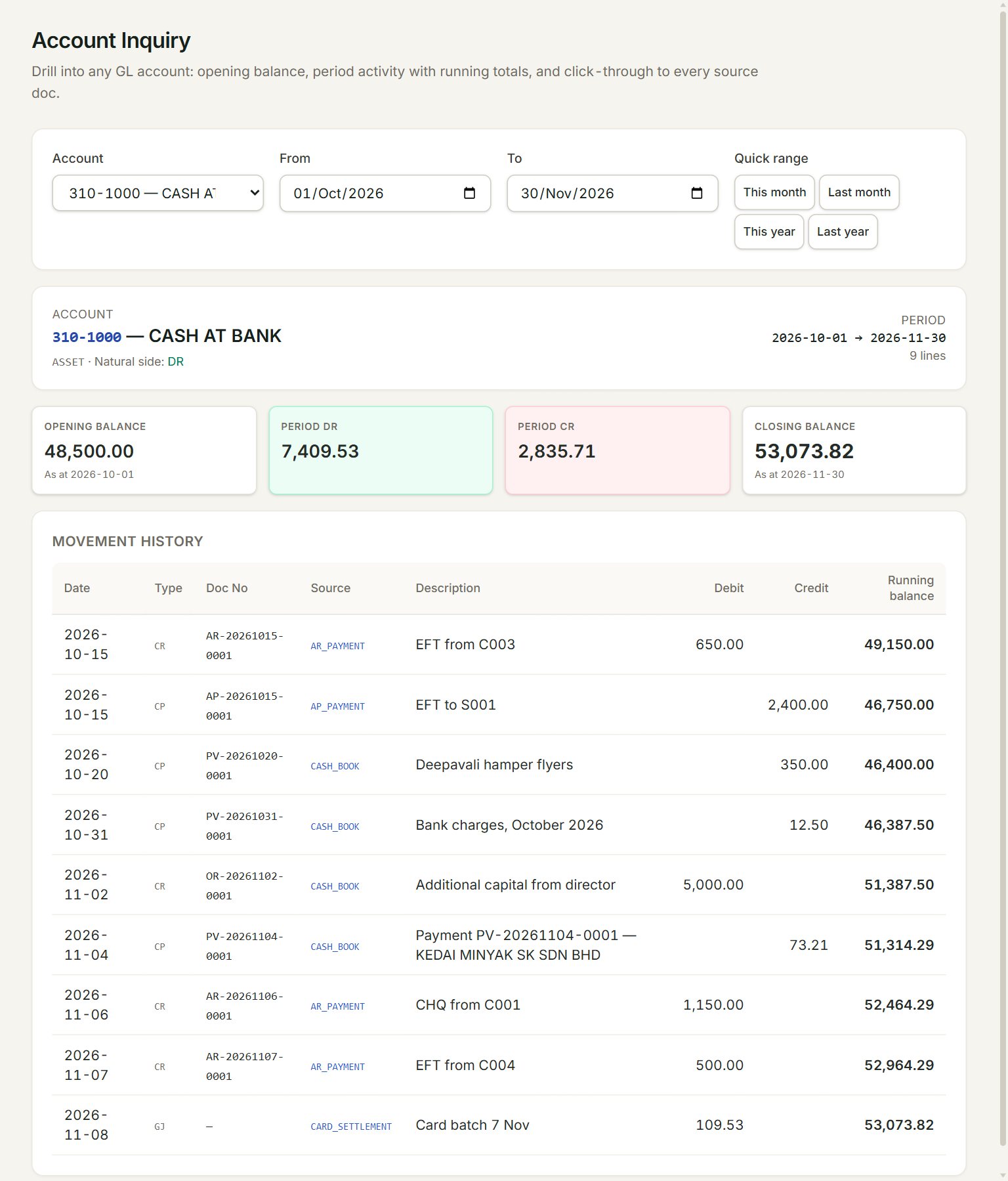
- Account: the account you want to see.
- From and To: the dates of the period.
- Quick ranges: This month, Last month, This year and Last year set both dates for you.
- Opening balance: the balance on the From date, before the period's entries.
- Closing balance: the balance at the To date.
- Source: the kind of document behind each line. Click it to open the document.
Look at an account
- In the menu, open Accounting, then Account inquiry.
- Choose the Account.
- Set From and To, or click a quick range.
- Read the lines under Movement history. Running balance is the balance after each line.
Period DR and Period CR add up the period's debits and credits. Lines from journal entries show manual under Source.
You can also start from the Chart of accounts: click an account's balance to see its entries.
If something goes wrong
- Pick a GL account above to drill into its activity.: choose an account in Account first.
- No activity in this period.: nothing was posted to the account between the two dates. Widen the dates.
- No drill-down page wired for source type: …: that kind of line cannot be opened from here yet. Open it from its own list, such as Cash book.