Outstanding sales orders
Customers' orders you have not delivered or invoiced yet, with how long each has waited.
On this page
Outstanding sales orders lists the orders your customers have placed that you have not delivered or billed yet. Check it each morning so no order is forgotten.
The screen
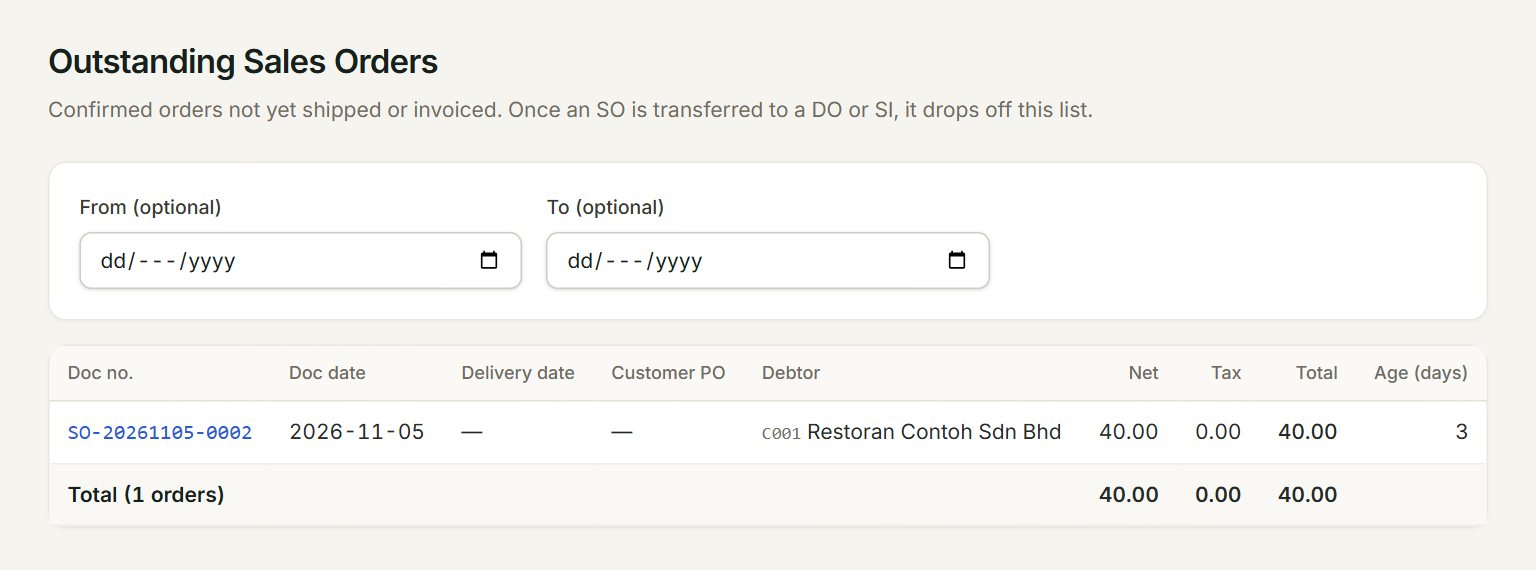
- From (optional) and To (optional): show only orders dated between them. Leave both empty to see every open order up to today.
- Doc no.: click it to open the order.
- Delivery date and Customer PO: as keyed on the order.
- Debtor: the customer who ordered.
- Age (days): days since the order date. It turns amber after 30 days and red after 60.
- Total: how many orders are open, and what they are worth before and after tax.
Deliver or bill an open order
- In the menu, open Reports, then Outstanding sales orders.
- Start at the top: the oldest orders come first.
- Click the order's Doc no. to open it.
- Click Transfer →, choose Delivery Order or Sales Invoice under Transfer to, and click Transfer.
- The order drops off this list.
You can also start from the other side: in a new sales invoice, choose the debtor and click Transfer from… to bring in the order's lines.
If something goes wrong
- No outstanding sales orders. Everything's either fulfilled or hasn't been placed yet.: every order has been transferred, or the dates leave them out. Clear From (optional) and To (optional).
- An order is not on the list: once any part of it is delivered or invoiced, it leaves this list. Open it from Sales orders to see what is left.