Supplier credit notes
Record a credit a supplier gives you, for a short delivery, damaged goods or a price that was too high.
On this page
A supplier credit note records an amount a supplier takes off what you owe them: goods short-delivered or damaged, or a price that was too high. The screen is titled AP Credit Notes. The credit can come off one unpaid bill straight away, or be held as credit.
Goods that go back to the supplier belong on a purchase return instead: it takes them out of stock and makes the credit note for you.
The screen
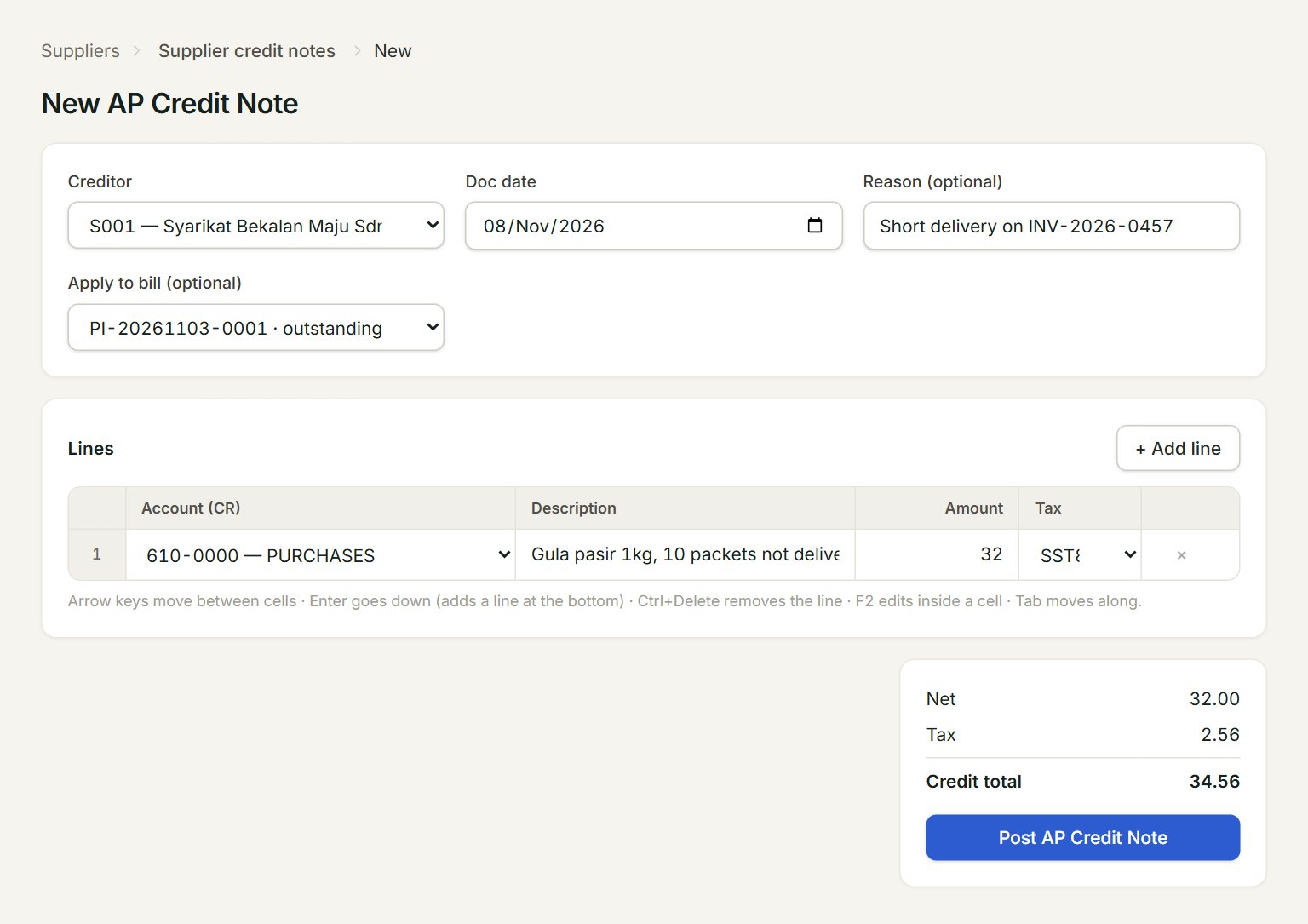
- Creditor: the supplier giving the credit.
- Reason (optional): why, for example a short delivery. It shows in the list.
- Apply to bill (optional): the unpaid bill the credit comes off. — hold as unapplied credit — keeps it as credit.
- Account (CR): the account the credit goes to: usually the one the bill was charged to, such as 610-0000 PURCHASES.
- Amount: the amount before tax. Pick the same Tax code as the bill.
- Post AP Credit Note: saves and posts the credit note.
Record a credit
- In the menu, open Suppliers, then Supplier credit notes, and click New.
- Choose the Creditor and check the Doc date.
- Type the Reason, and choose the bill in Apply to bill (optional).
- On each line, pick the Account (CR), type a Description and the Amount, and pick the Tax.
- Check the Credit total and click Post AP Credit Note.
The list
The AP Credit Notes list shows each credit note's Total, how much is Unapplied (still held as credit) and its Reason. Credit notes made by purchase returns are here too. Edit stays grey: a posted credit note cannot be changed.
If something goes wrong
- Post AP Credit Note is grey: choose the creditor first.
- "Add at least one line with amount > 0 and a description.": each line needs an amount and a description.
- The bill is not in Apply to bill: only this supplier's unpaid bills are listed. A bill paid in full has nothing left to take the credit off.