Outstanding purchase orders
Orders you placed with suppliers that have not been received or billed yet.
On this page
Outstanding purchase orders lists the orders you have sent to suppliers that have not arrived or been billed yet. Use it to chase late deliveries.
The screen
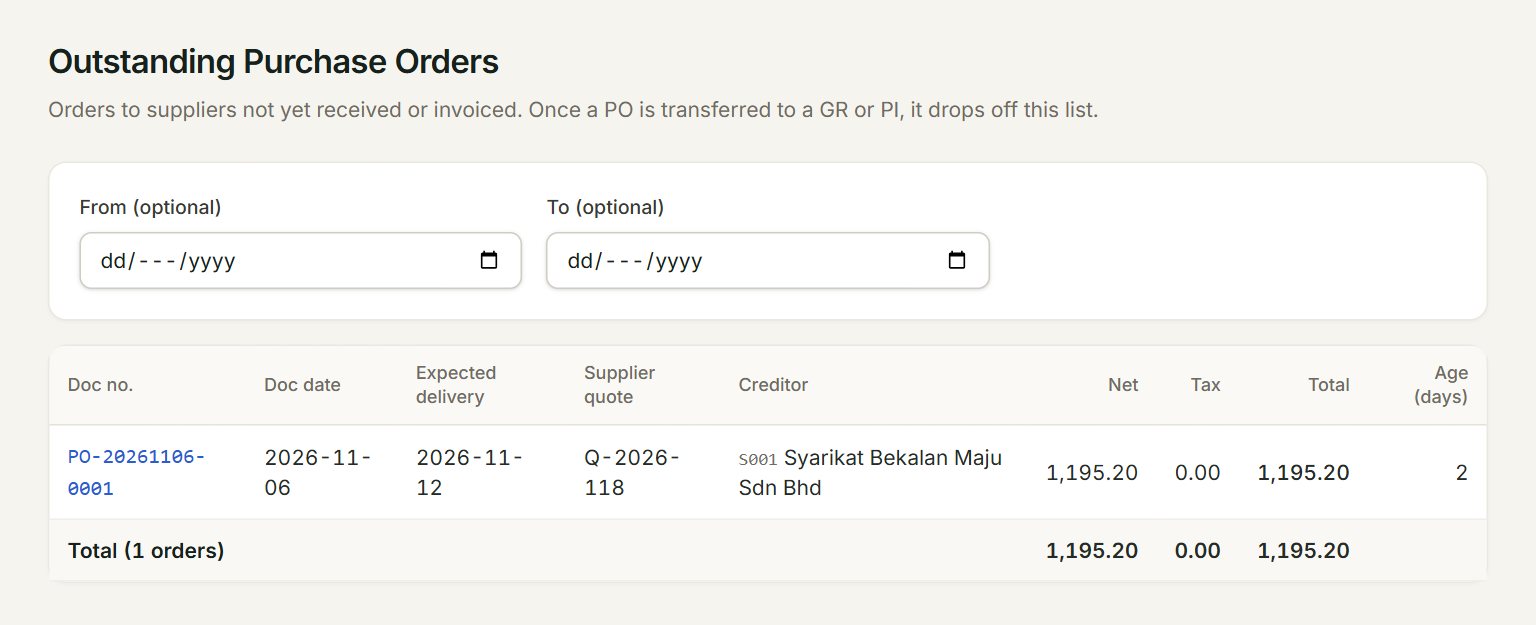
- From (optional) and To (optional): show only orders dated between them. Leave both empty to see every open order up to today.
- Doc no.: click it to open the order.
- Expected delivery and Supplier quote: as keyed on the order.
- Creditor: the supplier.
- Age (days): days since the order date. It turns amber after 30 days and red after 60.
- Total: how many orders are open, and what they are worth before and after tax.
Receive or bill an open order
- In the menu, open Reports, then Outstanding purchase orders.
- Look for orders past their Expected delivery date, and call those suppliers.
- When the goods arrive, click the order's Doc no. to open it.
- Click Transfer →, choose Goods Received or Purchase Invoice under Transfer to, and click Transfer.
- The order drops off this list.
You can also start from the other side: in a new purchase invoice, choose the creditor and click Transfer from… to bring in the order's lines.
If something goes wrong
- No outstanding purchase orders.: every order has been transferred, or the dates leave them out. Clear From (optional) and To (optional).
- An order is not on the list: once any part of it is received or billed, it leaves this list. Open it from Purchase orders to see what is left.