Aged payables
What you owe each supplier on a date, split by how old the unpaid bills are.
On this page
Aged payables lists every creditor (supplier) you owe money to, with the amount split by age. Use it to plan which bills to pay this week.
The screen
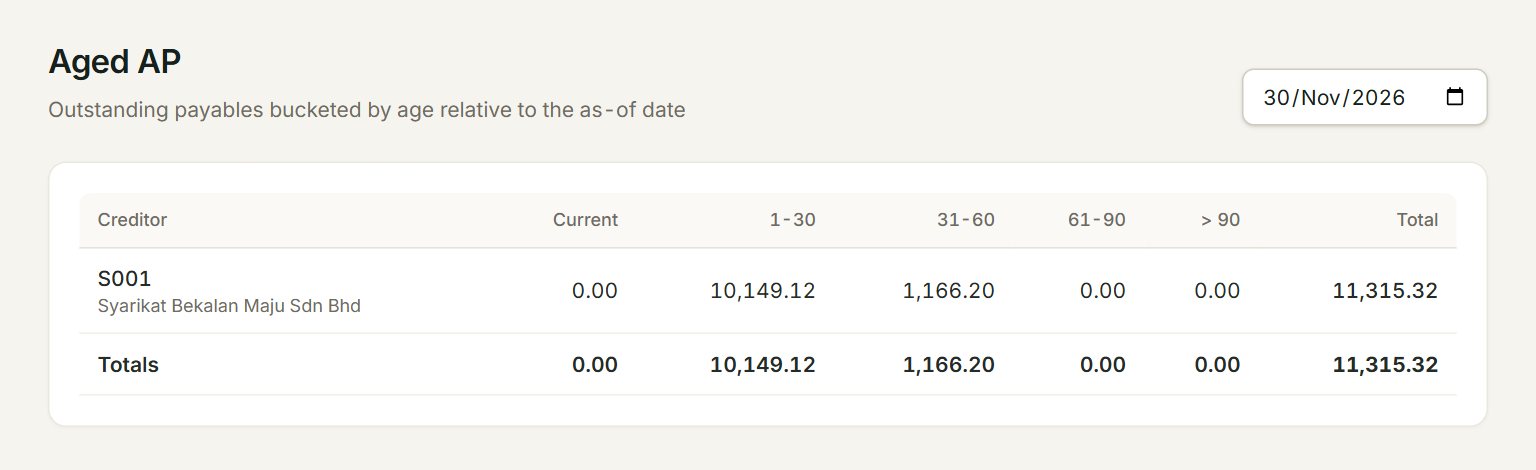
- The date: the report shows what you owed at the end of this day. It starts at today.
- A row: one creditor, with their code and name.
- Current: bills dated on the date itself. 1-30: 1 to 30 days old.
- 31-60, 61-90 and > 90: older bills. Suppliers will be asking about these.
- Total: everything you owed the creditor on that date.
- Totals: each column added up. The last figure is everything you owe your suppliers.
The age counts from the bill's date, not its due date.
Plan your payments
- In the menu, open Reports, then Aged payables. The screen is headed Aged AP.
- Change the date at the top right if you need another day. The report updates at once.
- Look along each row: the amounts under 61-90 and > 90 are the oldest.
- Check each supplier's statement against the one they sent you.
- Pay them in Pay supplier.
A payment counts only from its own date. Set the date to the end of last month and you see what you owed then, even if you have paid since.
If something goes wrong
- No outstanding AP for this date.: you owed nothing on that day. Check the date: it may be before your first bill.
- A minus amount: a payment made on account, or a supplier credit note, that is not yet knocked off a bill. Knock it off in Pay supplier or Supplier credit notes.
- A bill you paid still shows: the payment is dated after the report's date. Set a later date.