Stock locations
The places you keep stock, such as a warehouse and a shop. eaasycount keeps a balance for each.
On this page
Stock locations are the places you keep stock: a warehouse, a shop, a store room. eaasycount keeps a separate balance for each, so you know how many tins are in the shop and how many in the warehouse. The default location, marked ★ on documents, is the one they start with.
The screen
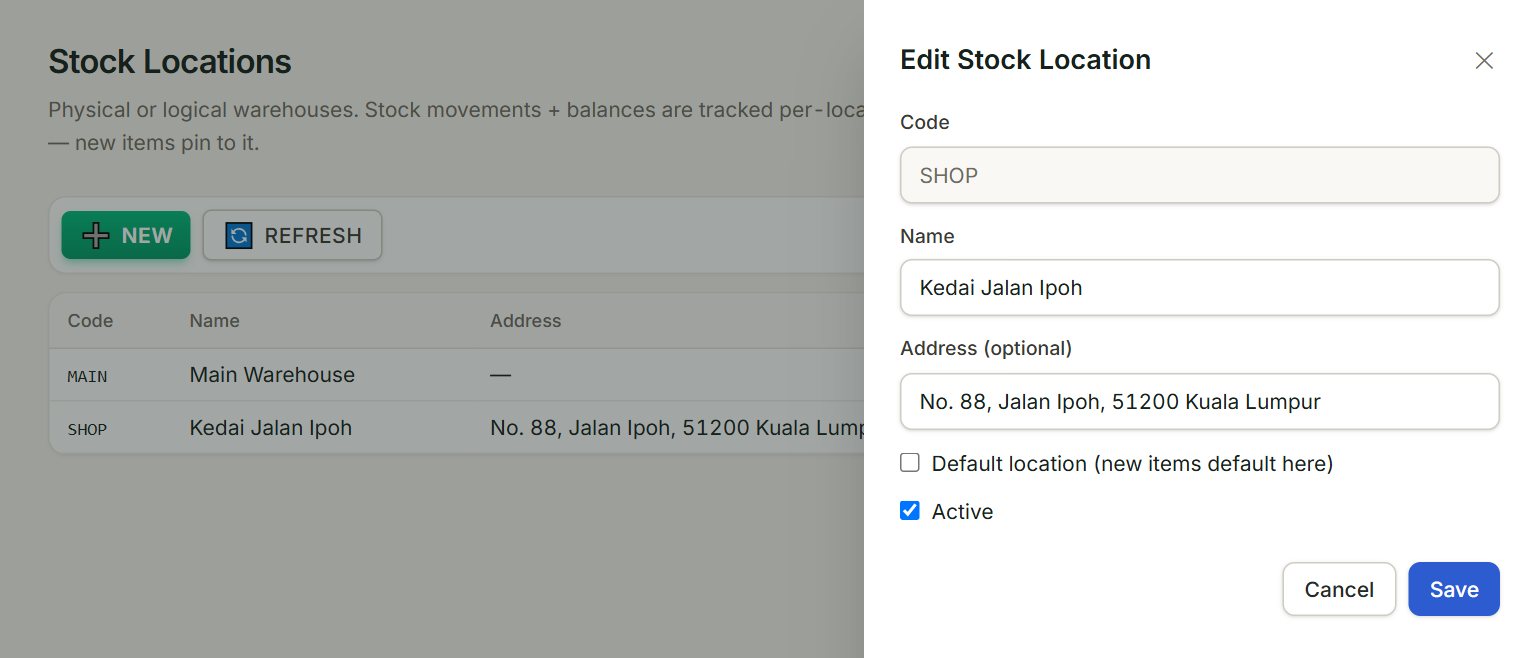
- NEW: adds a location.
- Code: a short code in capitals, such as MAIN or SHOP. It cannot be changed once saved.
- Name: the name shown next to the code, such as Kedai Jalan Ipoh.
- Address (optional): where the location is.
- Default location: tick it on the location documents should start with, usually your main warehouse.
- Save: saves the location.
Add a location
- In the menu, open Stock. Under Setup, click Stock locations.
- Click NEW.
- Type the Code and the Name, and the address if you like.
- Click Save.
- To put stock there, make a stock transfer from your main location, or buy straight into it.
Where locations are used
A purchase invoice has a Stock IN location, a sales invoice a Stock OUT location, and cash purchases and returns a Location (warehouse). Each starts on the default. A stock adjustment is always made at the default location. Item inquiry shows each location's balance of one item.
To stop using a location, open it, untick Active and click Save. Tick Show inactive to see it again.
If something goes wrong
- "Code is required." or "Name is required.": fill in both, then click Save.
- "Location '…' does not exist in this company, or is inactive.": choose another location, or open this one and tick Active.