Stock card
Every movement in and out of one stock item, with what was left after each.
On this page
A stock card lists every movement of one stock item: what came in, what went out, and what was left after each. Use it when the count on the shelf does not match the books.
The screen
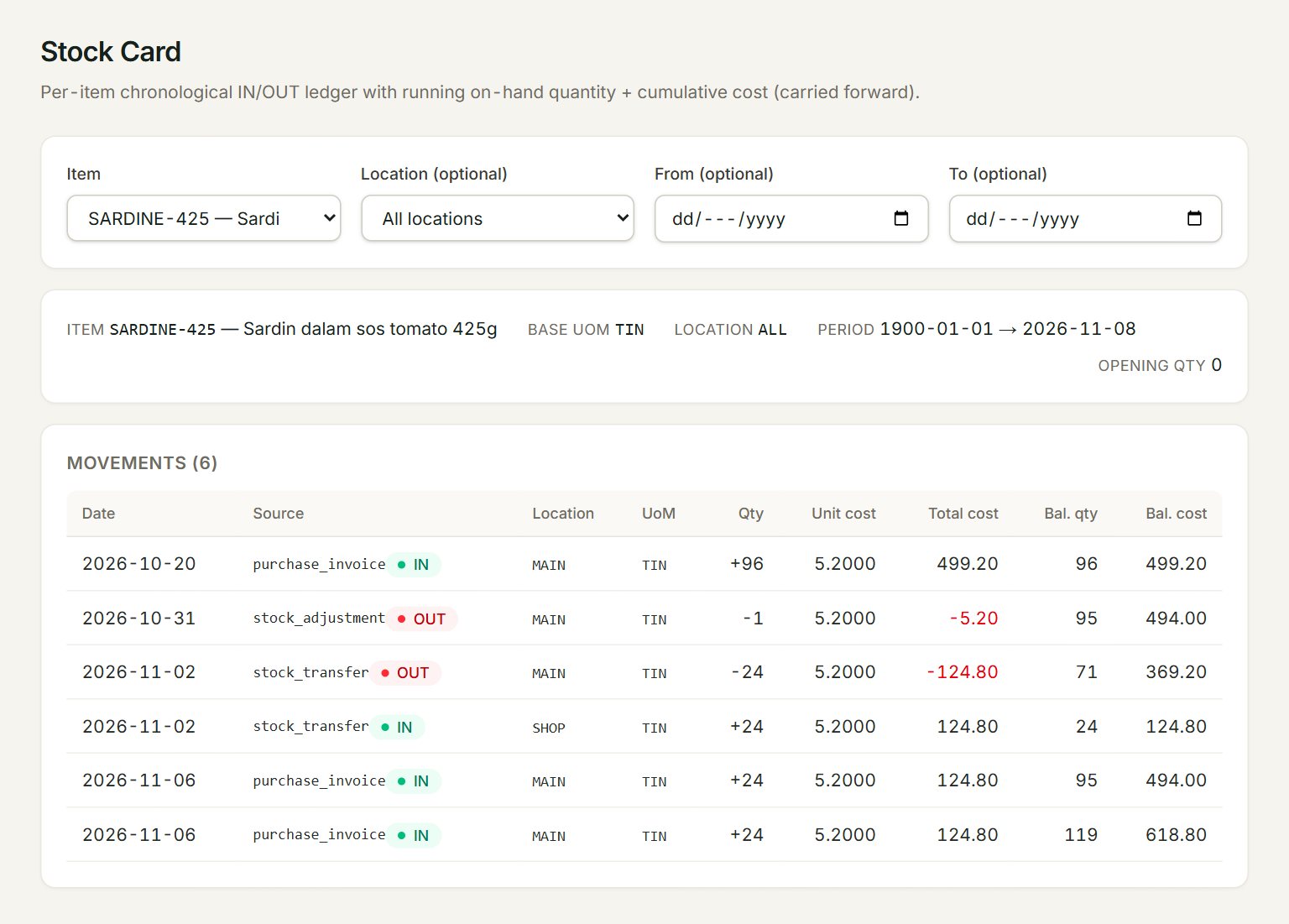
- Item: the stock item to follow.
- Location (optional): one location, or All locations.
- From (optional) and To (optional): the period. Left empty, the card runs from the start up to today.
- Opening qty: what was on hand before From.
- Source: the kind of document that moved the stock, marked IN or OUT. Qty is plus for stock in, minus for stock out.
- Bal. qty and Bal. cost: what was left at that line's location after the movement, and what it cost.
With All locations, each line's balance is for its own location, so the figures jump between locations. Choose one location to follow a single running balance.
Find a stock difference
- In the menu, open Reports, then Stock card.
- Choose the Item. The card appears at once.
- Choose the location you counted in Location (optional).
- Set From (optional) to the day of your last good count.
- Read down Bal. qty to find where the books and the shelf part ways, and check that day's documents.
- Correct the count with a stock adjustment.
If something goes wrong
- The item is not in the list: only items with Stock control ticked are listed. It is set when the item is made, in Items.
- No movements in this range.: nothing moved between the dates. Clear From (optional) and To (optional).