Monthly pay items
Key the amounts that change each month (overtime, commission, claims, allowances, deductions) and the month's attendance.
On this page
Monthly pay items holds the amounts that change from month to month: overtime, commission, claims, allowances and deductions for one month. When you calculate that month's payroll run, it picks them up.
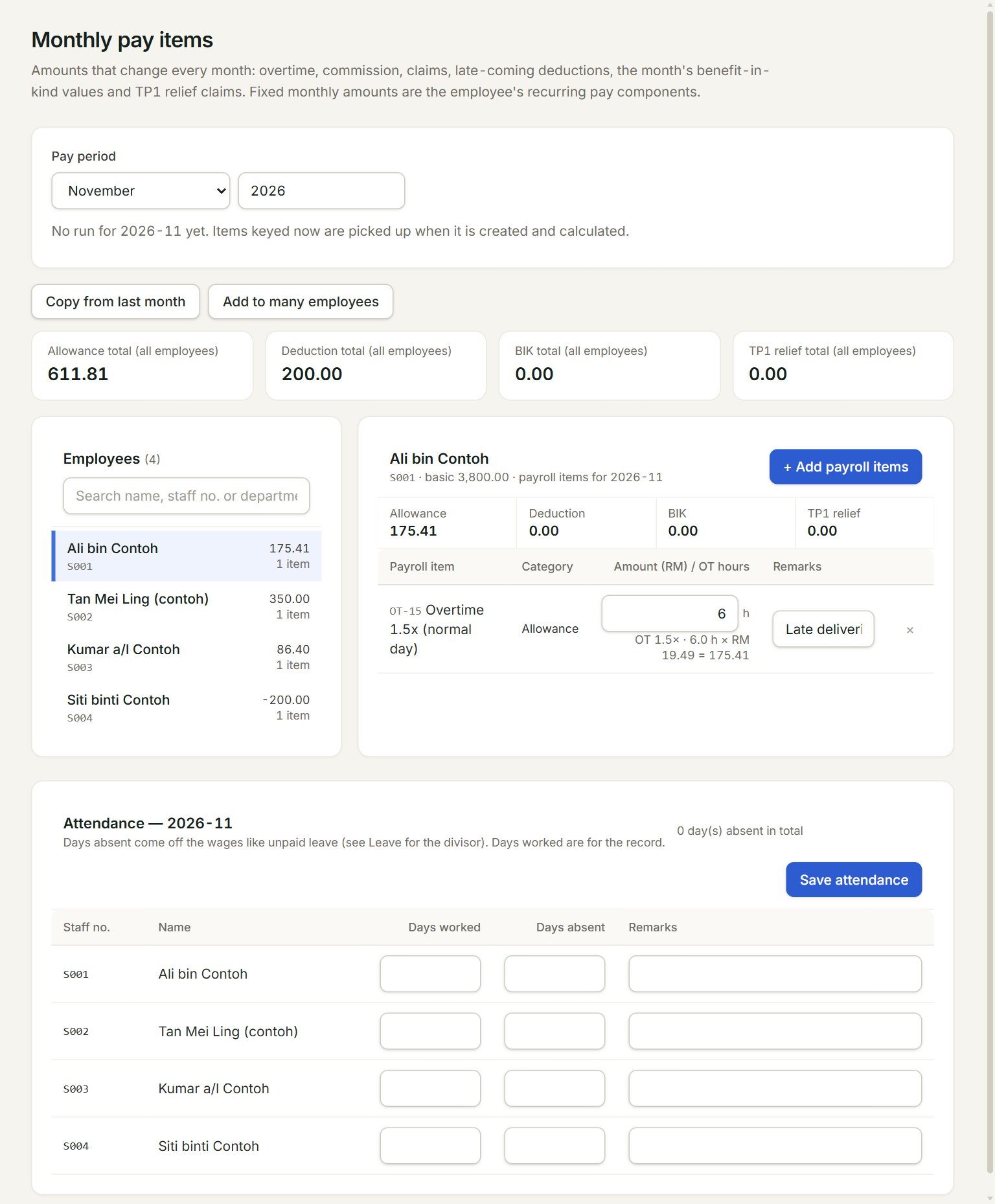
- Pay period: the month you are keying. It opens on the month after your last approved run.
- Copy from last month: copies last month's items here for you to check.
- Add to many employees: puts one item on several employees at once, for example a whole department.
- The employees. Click one to see their items. The figure is the month's items, allowances less deductions.
- + Add payroll items: picks items for this employee, under Allowance, Deduction, Benefits in kind (BIK) or Optional deduction (Form TP1 relief).
- Overtime is keyed in hours. eaasycount works out the amount from the employee's pay.
Key this month's items
- In the menu, open Payroll, then Monthly pay items, and check the Pay period.
- Click an employee on the left, then click + Add payroll items.
- Click a category, tick the items and click Add.
- Key the amount (the hours, for overtime) and a remark.
- Do the same for the other employees, then click Save.
- If the month's run is already calculated, open it and click Calculate again.
A claim or commission is an allowance; a salary advance or staff loan is a deduction. Key every amount above zero: the item decides whether it is paid or deducted.
Attendance
Below the items, Attendance has each employee's Days worked and Days absent for the month. Days absent come off the wages like unpaid leave. Key them and click Save attendance.
If something goes wrong
- Payroll … is approved. Its monthly pay items are locked.: that month is paid out. Key the correction in a later month.
- The amount must be above zero. Enter a deduction with a deduction component, not as a negative amount.: pick a deduction item and key the amount without a minus.
- Read only: keying monthly pay items needs the payroll approver or admin role.: ask your admin for the role.