Stock valuation
What your stock on hand is worth now, item by item, at average cost.
On this page
Stock valuation lists every stock item you have on hand, at each location, with its average cost and its value. Use it at month end to know what your stock is worth.
The screen
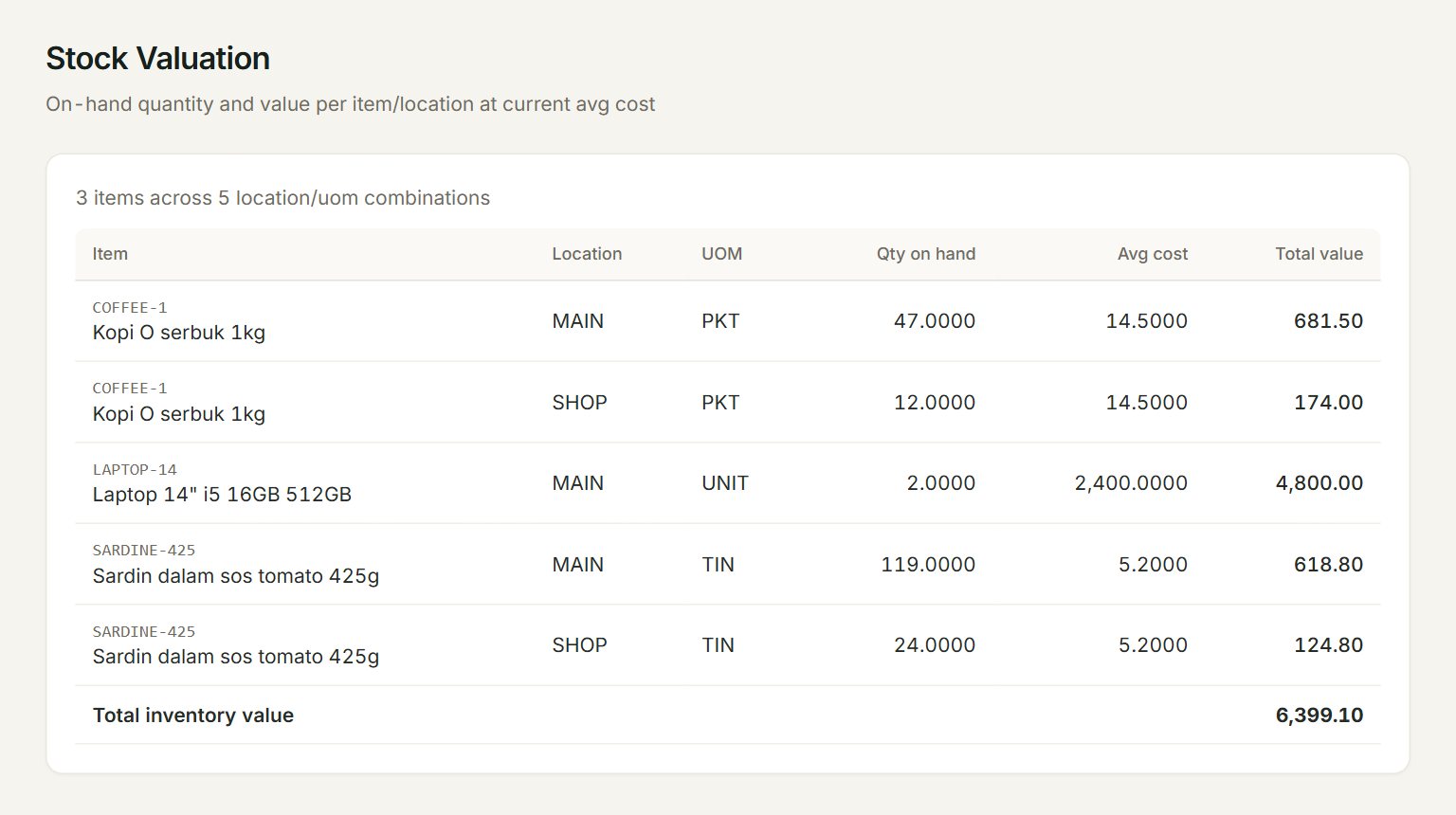
- A row: one item at one location.
- Location: where the stock is. An item kept at two locations has two rows.
- Qty on hand: how many are there now.
- Avg cost: the item's average cost for one unit.
- Total value: the quantity times the average cost.
- Total inventory value: all your stock, added up.
The report has no date and no buttons: it opens with your stock as it is now. Items with nothing on hand are left out.
Value your stock at month end
- Post all the month's purchases, sales and stock adjustments.
- In the menu, open Reports, then Stock valuation.
- Check each item's Qty on hand against your stock count.
- Fix any difference with a stock adjustment, then open the report again.
- Note the Total inventory value for your month-end figures.
If something goes wrong
- No stock on hand.: no stock item has any quantity yet. Stock comes in with a purchase invoice, goods received or a stock adjustment.
- An item is missing: it has nothing on hand, or it is not a stock item. Only items with Stock control ticked are counted.