Tax codes
The tax rates on your invoices and bills, and the accounts each tax posts to.
A tax code is a tax rate you can pick on a line, such as SST8 for 8% service tax. Each code says which account the tax posts to: sales tax to an output account, tax on purchases to an input account.
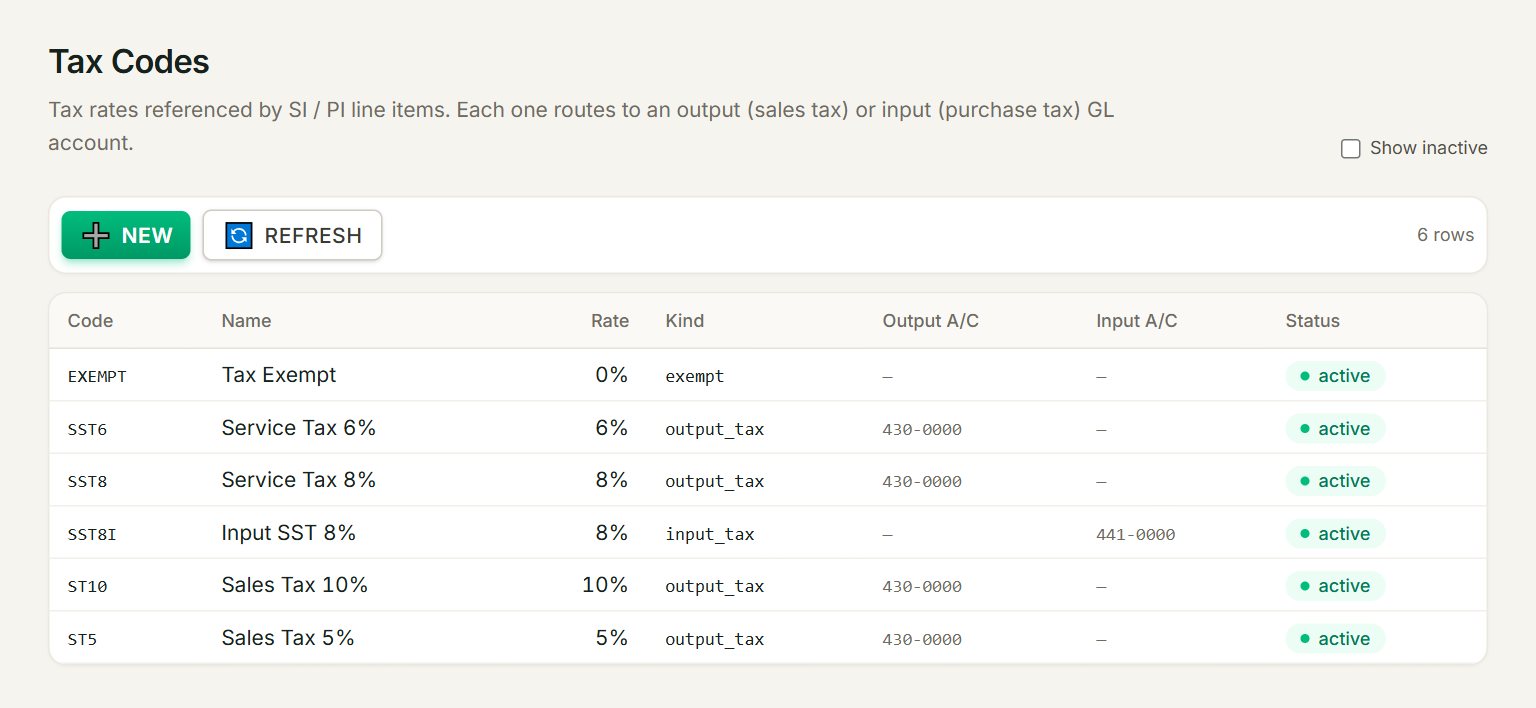
- NEW: adds a tax code.
- A row: click it to change the tax code.
- Rate: the percentage.
- Kind: output_tax for sales, input_tax for purchases, or exempt and zero_rated.
- Output A/C: where tax on sales posts, here 430-0000 SALES TAX.
- Input A/C: where tax on purchases posts, here 441-0000 INPUT TAX.
Add a tax code
- In the menu, open Accounting, then Tax codes, and click NEW.
- Type the Code, for example SST8, and the Name.
- Key the Rate (%) and choose the Kind.
- Choose the Output GL account (sales side) for a tax you charge, or the Input GL account (purchase side) for a tax you pay.
- Click Save.
The code and the kind cannot be changed after you save. To change the rate or the accounts, click the tax code in the list. A tax code is never deleted: to stop using one, click it, untick Active and click Save.
If something goes wrong
- A tax code is missing from the Tax list in the Cash book: a payment lists only codes with an Input A/C, and a receipt only codes with an Output A/C. Set the account here.
- Rate must be a non-negative number.: key the rate as a number, such as 8, with no % sign.