Stock adjustments
Put your stock right after a count: write off what is missing or damaged, add back what you found.
On this page
A stock adjustment puts your stock right when the shelf and eaasycount disagree: after a stock count, or when goods are damaged, lost or found. A minus line writes stock off at its average cost. A plus line adds stock at a cost you key in. The value goes to your stock adjustment account.
The screen
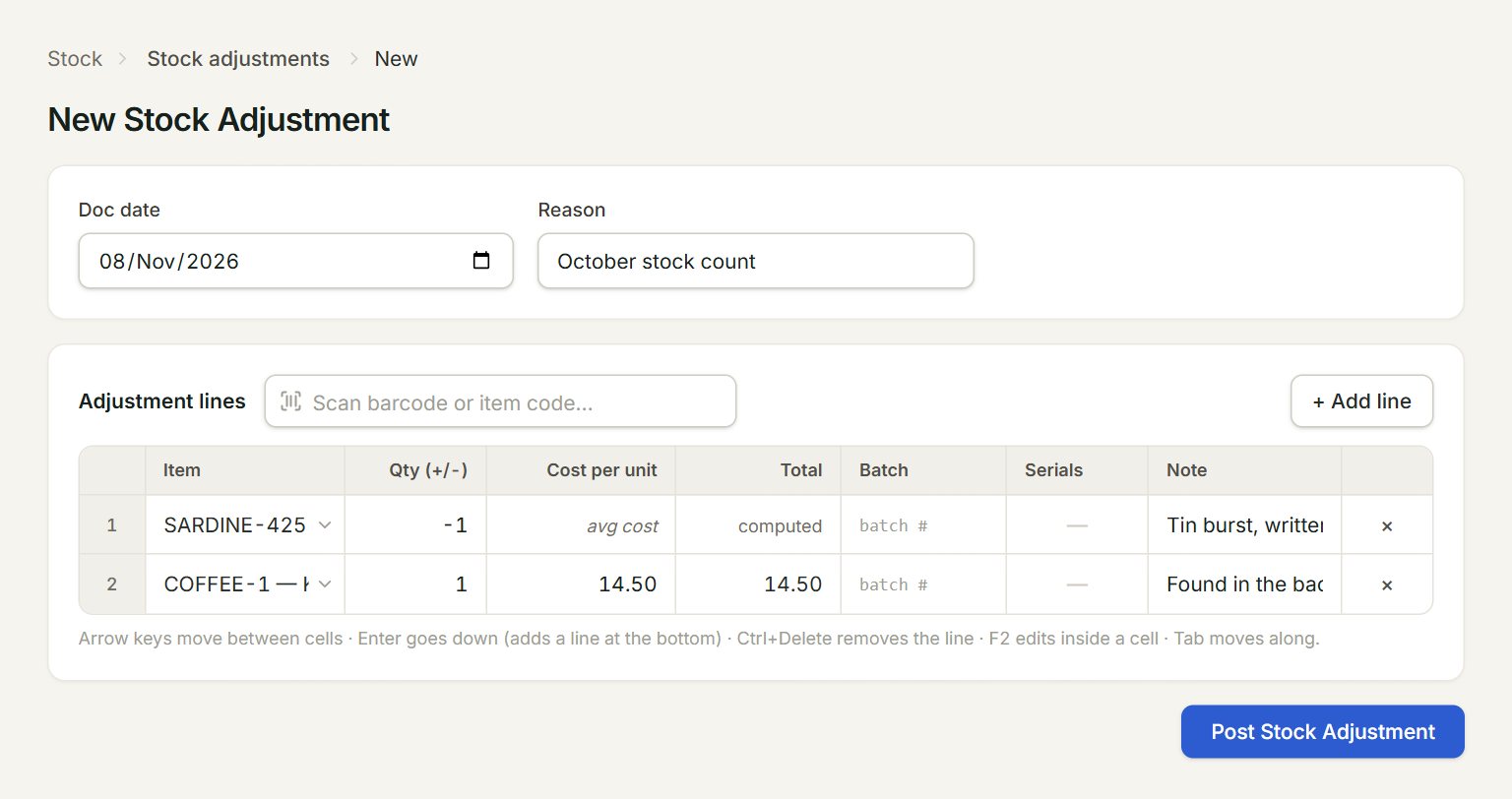
- Reason: why, for example the month's stock count. It shows in the list.
- Scan a barcode or type an item code here and press Enter: the line is added.
- Qty (+/-): minus for stock written off, plus for stock found.
- Cost per unit: what each unit found is worth. A plus line needs one.
- avg cost: a minus line goes out at the item's average cost, so there is nothing to key.
- Post Stock Adjustment: saves and posts the adjustment.
Adjust after a count
- In the menu, open Stock, then Stock adjustments, and click New.
- Check the Doc date and type the Reason.
- Add a line for each item that is wrong: scan or type its code, or click + Add line and choose the Item.
- Key the difference in Qty (+/-): -2 for two missing, 3 for three found. Key the Cost per unit on a plus line.
- Type a Note on a line if it helps, for example "Tin burst".
- Click Post Stock Adjustment.
The list
The Stock Adjustments list shows each adjustment's Location, the account it went to (Adj Account) and its Reason. To correct one, select it and click Edit: the number stays the same and the old version is kept as void.
If something goes wrong
- "Positive qty (found) needs a cost per unit > 0.": key the Cost per unit on every plus line.
- "Add at least one line with item and qty != 0.": choose an item and key a quantity other than 0.
- "Line 1: … is serial-tracked — enter … serial number(s) (🔢).": click the line's 🔢 button under Serials and key, or pick, one serial number for each unit.